
Quick answer: Caching everywhere is a full-stack strategy that applies caching at every layer—browser, CDN, server, database, and edge—to deliver sub-second load times, improve SEO (Core Web Vitals), and reduce costs by minimizing origin requests.
Key takeaways
- Caching everywhere means implementing caching at browser, CDN, server, database, and edge layers for optimal performance.
- A full-stack caching strategy directly improves Core Web Vitals (LCP, CLS, INP) and reduces bounce rates from slow load times.
- Proper browser caching with Cache-Control headers and versioned filenames ensures instant repeat visits.
- CDN caching with edge locations and custom TTLs minimizes latency for global users, including those in the US and UK.
- Edge computing (like Cloudflare Workers) enables dynamic content caching with personalization and stale-while-revalidate.
What Does “Caching Everywhere” Actually Mean in 2026?
Caching everywhere is the practice of applying caching at every layer of the web stack—browser, CDN (Content Delivery Network), server, database, and edge functions—to minimize latency and reduce server load. Unlike traditional single-layer approaches that cache only in one place, this strategy ensures consistent sub-second load times across all devices and networks. A CDN is a network of edge servers distributed globally that caches and serves content from locations closer to users.
In 2026, this full-stack approach is no longer optional. According to Google data, 53% of mobile visits are abandoned if a page takes longer than 3 seconds to load. A comprehensive caching strategy directly addresses this by ensuring assets are served from the nearest possible location rather than your origin server every time.
Why Is a Full-Stack Caching Strategy Critical for Modern Web Performance?
A full-stack caching strategy is critical because it addresses performance at every bottleneck point, from the user’s browser to your database queries. The benefits extend beyond speed into SEO and operational costs. Core Web Vitals—specifically Largest Contentful Paint (LCP), Cumulative Layout Shift (CLS), and Interaction to Next Paint (INP)—are confirmed Google ranking factors, with LCP being directly improved by effective caching.
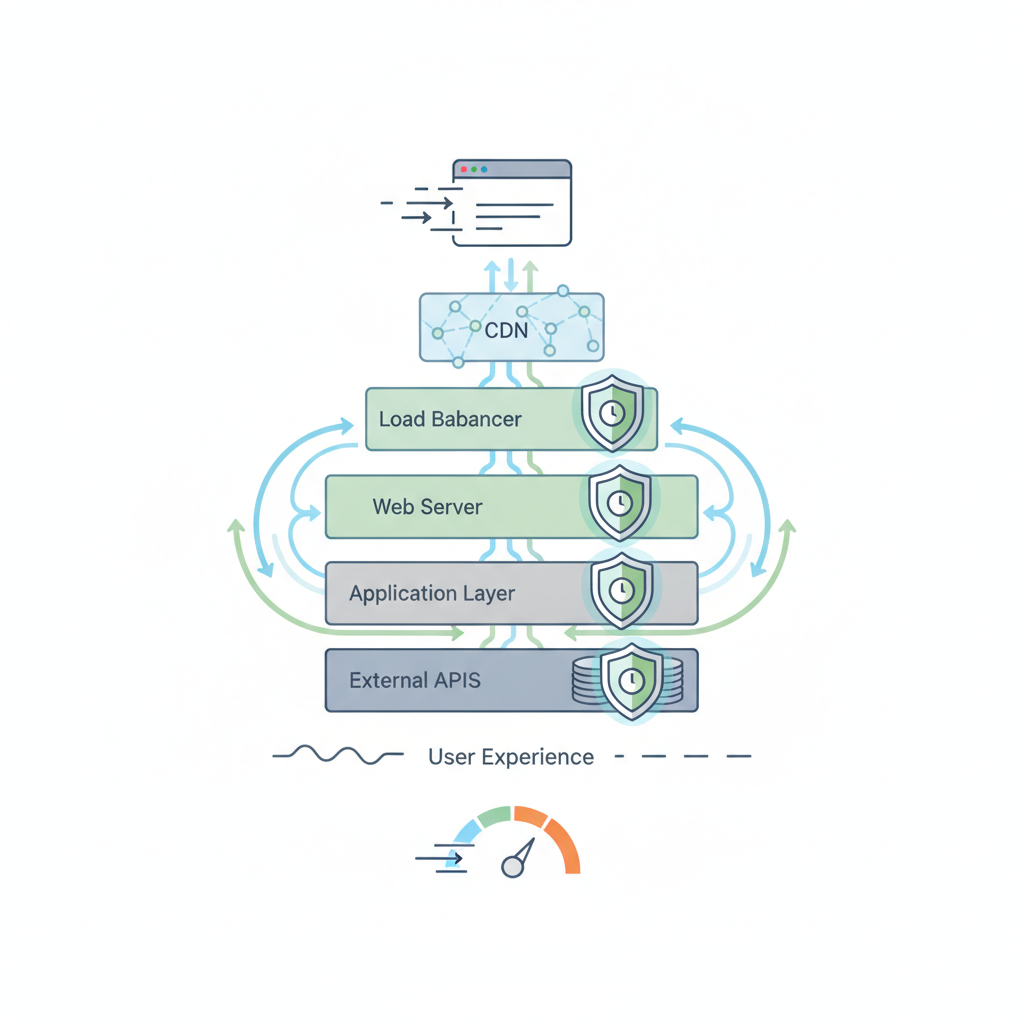
Cost savings are equally compelling. Every request served from cache instead of your origin reduces bandwidth consumption and server processing. For businesses using cloud hosting in the United States or the United Kingdom, this can measurably lower monthly infrastructure bills. Edge caching also reduces round-trip latency for users in both countries, where the physical distance between user and server can add 50–150 milliseconds per request without proper geographic distribution.
Layer 1: How to Optimize Browser Caching for Instant Repeat Visits?
Browser caching stores static files like images, CSS, and JavaScript directly on the user’s device, eliminating repeat downloads on return visits. To implement it correctly, you must set Cache-Control headers—the HTTP header that specifies caching directives—with appropriate max-age values. Cache static assets for 1 year, but set HTML to 0 seconds with revalidation so content stays fresh.
Use versioned filenames (e.g., styles.v2.css) to bust cache when files change; this forces browsers to fetch new versions rather than serving outdated files. For progressive web apps, implement service workers—scripts that act as network proxies—to cache assets for offline use and near-instant subsequent loads.
Key considerations for effective browser caching:
- Set Cache-Control: public, max-age=31536000 for static assets
- Use stale-while-revalidate to serve cached content instantly while updating in the background
- Always version or hash filenames to ensure cache invalidation on updates
- Exclude personalized or user-specific responses from long browser caching
Layer 2: Why CDN Caching Is the Backbone of a Global Strategy?
CDN caching is the backbone of a global caching strategy because it serves cached copies of your content from edge locations physically close to users, slashing round-trip times. Cloudflare and Amazon CloudFront are both available in the US and UK, offering rule-based time-to-live (TTL) settings for different content types. Cache images for a year, HTML for 0 seconds with stale-while-revalidate, and use custom cache keys for personalized content.
Modern CDNs support cache invalidation via URL purging, allowing instant removal of outdated content across all edge nodes. For API responses, implement Surrogate-Key headers to link related resources and invalidate them together when underlying data changes. This is particularly important for e-commerce sites serving both USD and GBP markets—you can cache the base product data while varying the currency display layer.
Layer 3: Server-Side Caching—How to Slash Response Times at the Origin?
Server-side caching at the origin significantly cuts response times by avoiding expensive backend processing on every request. Full-page caching with Varnish or Redis serves pre-rendered HTML instantly to all users, bypassing PHP, Python, or Node.js execution entirely. For pages with dynamic sections like prices or inventory, use fragment caching with Edge Side Includes (ESI) to cache static parts while retrieving dynamic elements separately.
For WordPress sites, plugins like WP Rocket handle full-page caching, while object caching via Redis—an in-memory data store—dramatically reduces database queries. Development agencies like 360Locker report up to 20x faster servers when combining server-level caching with optimized infrastructure. To implement effective server caching:
- Install Redis or Memcached and configure object caching
- Enable full-page caching for anonymous users
- Use ESI for personalized fragments only
- Set appropriate TTLs for cached pages (typically 300–3600 seconds)
Layer 4: Database Caching—What Are the Best Practices for 2026?
Database caching uses in-memory stores like Redis or Memcached—high-performance key-value stores—to cache frequent query results, reducing the load on your primary database. This is especially beneficial for read-heavy workloads: popular product lists, session data, and user profiles should be cached to avoid repeated expensive queries. Monitor your cache hit ratio—the percentage of requests served from cache without hitting the origin—and target above 90% for optimal performance.

Choose between write-through caching, where data is written to cache and database simultaneously, and write-around caching, where data goes only to the database until next read. Write-through ensures consistency but adds write latency; write-around is faster for writes but risks serving stale data on reads. Always invalidate cached entries when underlying data changes to prevent serving outdated information.
How Does Edge Caching and Serverless Change the Game in 2026?
Edge computing moves execution to geographically distributed servers, allowing dynamic content caching with personalization parameters. Cloudflare Workers and AWS Lambda@Edge let you cache a personalized homepage while invalidating it when a user’s cart changes. This effectively gives you the speed of static CDN delivery with the flexibility of dynamic content generation.
The stale-while-revalidate pattern is particularly powerful at the edge. Users receive instantly served stale content while the cache updates in the background, eliminating perceived latency entirely. This approach is ideal for e-commerce sites in the US and UK operating with different currencies—you can cache the base page layout globally and serve currency-specific pricing from the edge, bypassing origin round-trips for currency conversion.
What Are Common Caching Pitfalls and How Do You Avoid Them?
Common pitfalls can turn a caching strategy into a debugging nightmare, but you can avoid each with deliberate planning. Serving stale content after deployments is the most frequent issue; use cache invalidation or versioned URLs to force refreshes. Over-caching personalized data risks privacy breaches—never cache cookies or user-specific information without strict Vary headers.
For multi-market e-commerce serving both USD and GBP, the Vary header is critical if you wish to serve different currency displays. Here are your primary risks and solutions:
- Stale content: Automate purge on deployment via CDN APIs
- Cache-busting failures: Use content hashes in filenames
- Privacy leaks: Never cache responses with Set-Cookie headers
- Currency/regional mix-ups: Use Vary headers for Accept-Language and currency parameters
- Testing gaps: Always verify with Lighthouse—a free Google tool—and GTmetrix after changes
How to Audit Your Site’s Caching Effectiveness with Simple Tools?
Auditing your caching effectiveness requires measuring both configuration and real-world impact. Google Lighthouse, freely available, measures LCP and other Core Web Vitals scores so that you can see caching improvements reflected in concrete numbers. Verify response headers using curl or browser DevTools to confirm that Cache-Control and Age headers are present and correct—the Age header tells you how many seconds a resource has been served from cache.
Your CDN analytics dashboard, such as Cloudflare Analytics, displays cache hit ratio directly, showing the percentage of requests served from edge nodes. To measure actual performance improvements, run load tests with k6 or Loader.io—both accessible in the US and UK—before and after implementing changes. A complete audit checklist for good measure:
- Run Lighthouse and note LCP, CLS, and INP scores
- Inspect response headers for caching directives
- Review CDN cache hit ratio (aim for 90%+)
- Test time-to-first-byte (TTFB) with curl before and after
- Perform load tests to confirm reduced origin load
Caching Everywhere: A Competitive Advantage for E-Commerce
For e-commerce businesses serving both the United States and the United Kingdom, caching everywhere is not just a performance optimization—it is a competitive necessity. Full-stack caching cuts costs, improves Core Web Vitals, and delivers the sub-second experiences that customers in both markets increasingly expect. By applying caching at the browser, CDN, server, database, and edge layers, you ensure consistent speed regardless of user location or device type.
Development partners like 360Locker, which has delivered 120+ projects for 500+ clients since 2020, prioritize security-first builds alongside caching strategies. Their OWASP-aligned reviews and WAF/CDN integration complement a robust caching architecture. Whether you are launching a startup or scaling an established store, start by auditing where your biggest performance bottlenecks are, apply the appropriate caching layer to each, and measure the improvement—your users will feel the difference instantly. Implement caching everywhere, and your site will not just load faster—it will convert better, rank higher, and cost less to operate.
Frequently Asked Questions
What is caching everywhere?
Caching everywhere is a strategy of applying caching at all layers of the web stack—browser, CDN, server, database, and edge—to minimize load times and server load, ensuring fast and consistent performance for all users.
How do you implement browser caching?
Set Cache-Control headers for static assets (e.g., images, CSS, JS) with a long max-age (e.g., 1 year) and use versioned filenames (like styles.v2.css) to bust cache when files change. Leverage service workers for offline support.
What should be cached at the CDN level?
At the CDN level, cache static assets (images, CSS, JS) and entire HTML pages if possible. Use rule-based TTLs: for example, cache images for 1 year, HTML for 0 seconds with stale-while-revalidate, and use custom cache keys for dynamic content.
Which server-side caching techniques are most effective?
Effective server-side techniques include full-page caching with Varnish or Redis to serve pre-rendered HTML, fragment caching with ESI for dynamic parts, and object caching for WordPress using Redis or WP Rocket.
How does database caching improve performance?
Database caching uses in-memory stores like Redis or Memcached to cache frequent query results and aggregated data, reducing database load and latency. Maintain a cache hit ratio above 90% and invalidate on updates to avoid stale data.
How can I measure the impact of caching on my site's performance?
Use Google Lighthouse to measure LCP and other Core Web Vitals, analyze response headers with curl or DevTools to verify Cache-Control and Age headers, check your CDN dashboard for cache hit ratio, and run load tests with k6 or Loader.io before and after caching.